M64Plus FZ Emulator
- 4.7
- Rating
- 10.00M
- Installs
- Free
- Price
 Analysis by App-foxy
I approached M64Plus FZ Emulator less like a conventional arcade game and more like a doorway back to a certain 64-bit console library. That distinction matters immediately: the app does not hand you a new campaign, a built-in character, or a self-contained set of stages. Its purpose is to emulate console software, so the experience depends on what you bring to it and how comfortably you configure it.
That makes the first action unusually personal. Instead of tapping “start” and entering a designed tutorial, I had to think about the game I wanted to run, the controls I preferred, and whether I was in the mood for a quick nostalgic session or a longer living-room-style play period. The developer is Francisco Zurita, and the app sits in the arcade section, where its appeal comes from immediate interaction rather than a long explanation of systems.
The app is free and rated for Everyone, which lowers the barrier to trying it. It has also become a widely used choice, with over ten million installs and a 4.7 average from around one hundred thirty-eight thousand ratings. Those figures suggest that the emulator has reached far beyond a small group of enthusiasts, but popularity does not remove the need for preparation. An emulator can be excellent and still feel confusing if you expect it to behave like a normal downloadable game.
You May Also Like

 Blood Strike: 2.5 Anniversary
Blood Strike’s Loadouts Turn Every Drop Into a Tactical Gamble
A close look at Blood Strike’s custom loadouts: how fast access to signature weapons reshapes its battle royale rhythm, rewards preparation, and narrows the gap between fights.

 Pandora - Music & Podcasts
Pandora’s Music Is Easy to Start, but Harder to Recover
Pandora’s strength is its low-effort path from a seed to a station. Its weak spot is how much confidence it asks you to place in connection, setup, and quiet recovery.

 8 Ball Pool
 Is Built on Rivalries, Rematches, and Routine
A close look at the rivalries, rematches, shared routines, and unanswered safety questions that turn a quick pool match into a persistent mobile community.

 Samsung Music
’s Quiet Strength Is Playing What You Already Own
Its reach comes less from spectacle than from dependable access to a personal library. That simplicity is both the app’s strongest retention engine and its ceiling.

 AccuWeather: Weather Radar
AccuWeather Review: A Quick, Clear Forecast for Everyday Decisions
For everyday plans, the best forecast is the one you can understand quickly. AccuWeather makes rain timing, radar, and local conditions easy to act on, with a few trade-offs.

 Hill Climb Racing
Why Hill Climb Racing Still Turns Crashes Into One More Run
A tiny car, a bumpy hill and one more upgrade: Hill Climb Racing keeps resurfacing because its simple chaos makes every near-miss feel personal.
More From Our News Desk



From choosing a game to making the first move
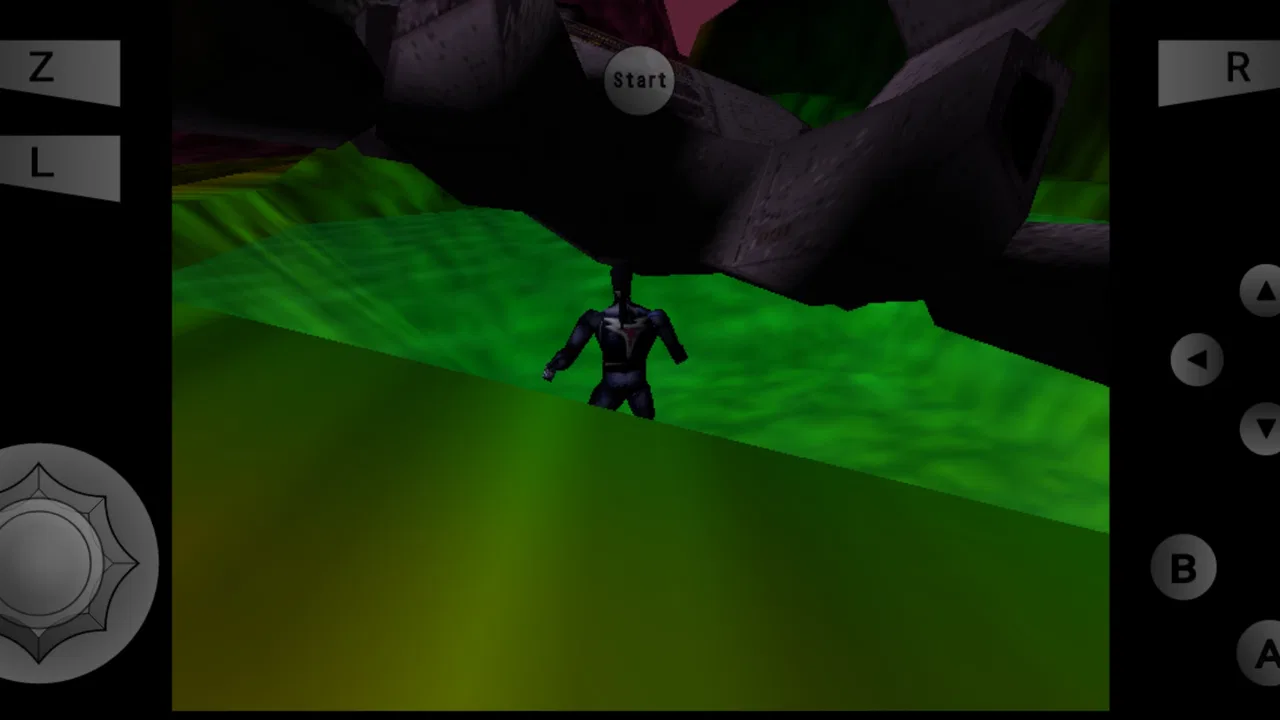
I find the first decision is less about tapping through a menu and more about choosing a game that suits the time and setup I have. A short session calls for a title I already know and controls I can use comfortably; a new game deserves a little room to test its feel. That choice sets up the next question: how well do my inputs translate into what happens on screen?
The real beginning is preparation
With a regular arcade title, the opening action is obvious: press a button, watch a short introduction, and begin. Here, the meaningful first action is deciding which compatible console game you want to use and arranging your library in a way that makes sense on your device. That extra step is the main difference between this app and a self-contained arcade release.
I found it useful to treat the emulator as the player and display layer rather than as the game itself. Once that idea is clear, the setup feels less mysterious. You are not waiting for M64Plus FZ Emulator to provide content; you are using it to access software from a particular console era. The first few minutes therefore reward patience more than reflexes.
For anyone new to emulation, this is also where expectations should be realistic. The app does not turn every old console experience into a perfect modern mobile game. Some titles suit a touchscreen, while others were designed around a physical controller and several simultaneous inputs. A platform game may be manageable with on-screen buttons, yet a title that demands precise camera control can feel awkward until the layout becomes familiar.
Controls decide whether the loop feels natural
The control layer is the first place where I would spend time experimenting. A virtual stick placed too close to the edge can make movement feel cramped, while buttons that are too small invite accidental taps. The best layout is not necessarily the default one; it is the one that lets your thumb return to the same positions without searching.
My practical advice is to test controls in a safe part of a game rather than judging them during a difficult section. Walk, turn, jump, open a menu, and try the actions you use most often. If a button combination feels uncomfortable there, it will become more frustrating when the screen is busy. A small adjustment at the beginning can make the difference between enjoying a session and abandoning it after a few mistakes.
A physical gamepad is the better choice for players who care about accuracy, long sessions, or games with demanding camera movement. Touch controls are convenient when the phone is all you have, and they can work surprisingly well for slower exploration or casual play, but they remain a compromise. This is one of the clearest situations where a different option is better: if you want console-like precision without adapting to a screen, use a controller or choose a native mobile game built around touch.
Why the first successful launch feels rewarding
The first reward is not a badge or a new unlock inside the emulator. It is the moment when a familiar title responds correctly: the character moves, the camera follows, a sound arrives at the right time, and the game stops feeling like a technical experiment. That transition from setup to play is the app’s most satisfying early payoff.
It also explains why the emulator can be more appealing than a typical arcade download. A normal mobile game gives you one carefully controlled experience. This app gives you a way to revisit different kinds of experiences from the same console family, provided you already have the games and can get each one working comfortably. The reward is variety and access, not a single progression track.
The feedback rhythm: action, response, and adjustment
What I pay attention to is whether each action gives me a useful response, not just whether the game runs. When movement or camera control feels awkward, I pause and adjust one element at a time so I can tell what actually helped. That small discipline turns trial and error into a practical routine, and it leads naturally to what makes the effort worthwhile: reaching the next meaningful moment in the game.
Every input needs a clear answer
The core loop becomes tangible once a game is running: press a direction, see movement; tap a button, receive an action; make a mistake, learn what caused it; try again with a slightly better plan. M64Plus FZ Emulator succeeds when that chain feels immediate enough that I forget about the emulator and concentrate on the game.
That feedback is especially important in older 3D games, where movement and camera behavior can already require adaptation. If the controls feel delayed or the visual presentation is uncomfortable, the emulator becomes part of every decision. When the response feels consistent, the original game’s rhythm comes through more clearly, and the phone becomes a practical way to play rather than an obstacle between me and the software.
I would not judge the app by one title alone. Different games place different demands on emulation, graphics, sound, memory handling, and controls. A game that feels smooth and natural may be a better demonstration of the app than one that is unusually demanding or poorly suited to touch input. In other words, the experience is partly about the emulator and partly about the individual software you choose.
Small tests prevent long troubleshooting sessions
A useful workflow is to begin with a short test rather than immediately committing to a long play session. Check whether the game starts properly, whether the main controls are comfortable, and whether saving and returning to play fit your routine. This approach saves time because it separates a control problem from a game-specific problem.
I also recommend changing one thing at a time. If you alter the control layout, display behavior, and other available settings together, it becomes difficult to know which change helped or hurt. A measured approach is less exciting, but it gives you a repeatable setup and makes the next game easier to evaluate.
That is an overlooked strength of an emulator: it encourages you to become a better observer of your own play habits. Do you need a larger action button? Do you prefer a fixed virtual stick? Are you more comfortable holding the phone horizontally? These questions are not busywork. They directly influence whether the feedback loop feels fair.
Where friction enters the rhythm
The main weakness is that the app cannot erase the age of the games it runs. Older camera systems, unusual button layouts, and dated menus remain part of the experience. An emulator can present them faithfully, but it cannot redesign every awkward decision without changing the character of the original software.
Touch input adds another layer of friction. Your fingers cover part of the screen, and the physical sensation of pressing a real button is missing. For a quick session this may be acceptable; for a difficult section requiring repeated precision, it can make the same challenge feel harder than it did on the original hardware.
There is also a learning curve around managing a library. People who expect one tap from an app store page to instant gameplay may find the process too involved. Those who already understand emulation will likely see that preparation as a reasonable trade-off. I would skip this app if I wanted a polished, self-contained game with no file management, no controller decisions, and no need to think about compatibility.
Reward: why another stage still feels worth reaching
For me, progress matters most when it comes from understanding a game’s own challenges rather than from a wrapper adding artificial incentives. I try to set a modest target—a section to clear or a point to explore—so even a brief play feels complete. Once that goal is reached, the next useful skill is knowing when to stop without making the next visit harder to pick up.
The reward comes from the game, not the wrapper
M64Plus FZ Emulator does not need to manufacture its own reward system because the software you run supplies it. The satisfaction may come from clearing a tricky section, discovering a hidden route, completing a race, or simply hearing a familiar piece of music after years away. The emulator’s job is to make those moments accessible and stable enough to enjoy.
This creates a different emotional pattern from modern arcade games. There may be no daily challenge, energy timer, or constant stream of notifications pushing me back. Instead, I return because a particular game left an unfinished task in my mind. That can feel more deliberate: I choose the title, remember the problem, and resume the attempt.
For families or younger players, the Everyone rating makes the app easier to consider as a general-purpose gaming tool, but the actual suitability still depends on the console games being used. The rating describes the app, not every piece of software someone may load into it. I would still choose the library with the same care I would use for any gaming device shared with children.
Use cases beyond nostalgia
Nostalgia is the obvious reason to install an emulator, but it is not the only one. I can see it being useful for someone who wants to revisit a game they remember but no longer has room for original hardware, or for a player curious about how console design handled 3D movement before mobile controls became standard.
It can also support short, focused sessions. Suppose I have a spare half hour while traveling. Rather than opening a large modern game that expects a long commitment, I can select one familiar title, play through a specific objective, and stop. The appeal is not that every session is effortless; it is that the emulator gives me access to a broad range of older play styles from one mobile installation.
Another practical use is comparison. Playing an older game on a phone makes me notice how much its design depends on camera placement, button mapping, and level structure. That is valuable for anyone interested in game design, not just someone chasing memories. The limitations become part of the lesson.
How it compares with ordinary arcade alternatives
A native arcade game is usually easier to start. It has controls designed for the phone, predictable menus, and a consistent visual presentation. If your priority is instant action with no setup, that kind of game is the safer recommendation.
M64Plus FZ Emulator wins on breadth and historical character. Instead of one new interpretation of arcade play, it can serve as a gateway to software from a specific 64-bit console generation. The trade-off is that quality and comfort vary more from game to game. A native title gives you consistency; an emulator gives you choice and a closer connection to older hardware design.
Compared with a dedicated console or handheld, the phone is more convenient but less tactile. You already carry it, and the app is free to try, yet the screen and touch controls cannot fully reproduce a physical controller. A dedicated device is better for someone who values comfort and authenticity above portability. The emulator is better for someone who values access and flexibility.
Session reset: stopping cleanly and wanting to return
A clean stopping point helps me return with the game and controls still familiar, instead of spending the next session reconstructing what I was doing. I prefer pausing after a clear objective and keeping my attention on one title long enough to learn its rhythm. That habit makes the whole experience feel less like managing a library and more like a deliberate play session, which brings me to my overall judgement of the loop.
A good ending is part of the experience
The reset point is where I decide whether the app has earned another session. In a conventional game, that might mean reaching a checkpoint or completing a round. With an emulator, it also means leaving the game in a state that makes the next visit easy. I want to remember what I was doing, close the session without confusion, and return without rebuilding my setup from the beginning.
That is why I prefer establishing a simple routine: choose one game, play toward one clear objective, and stop at a natural pause. Jumping constantly between titles can make the library feel impressive but strangely unsatisfying. Focusing on one game lets the controls become automatic and makes progress easier to feel.
Short sessions are also a useful test of whether a game belongs on your phone. If the first ten minutes are spent fighting the interface rather than playing, the problem may not be the emulator alone. The title may need a controller, a larger screen, or the original hardware’s physical layout. Recognizing that early prevents the common mistake of blaming every discomfort on the app.
Why the next session begins
The reason to return is usually unfinished business. A level remains incomplete, a route has not been explored, or a remembered moment is still waiting to be found. That motivation is quieter than a reward calendar, but it can be stronger because it comes from the game itself.
I also like that the app can turn a phone into a small personal archive of console experiences. The value grows when the library is chosen thoughtfully rather than filled without a plan. Keep the games you genuinely want to play close at hand, organize them in a way you understand, and avoid treating the emulator as a collection project. The point is to play, not merely to accumulate options.
There is a clear limit, though. If you dislike revisiting older design conventions, you may not feel that pull to return. The emulator cannot make every classic game feel modern, and it should not be judged as if that were its purpose. Players seeking current graphics, touch-first mechanics, or a guided progression system will likely be happier with a contemporary arcade release.
My verdict on the complete loop
Taken together, the experience rewards players who enjoy a little preparation as part of playing. I like that the payoff comes from the console game itself, while recognizing that touch input and older design choices can make some sessions less comfortable than a native mobile game. The deciding question is whether that trade-off feels like a worthwhile route back into the games I want to play.
Who should install it
I recommend M64Plus FZ Emulator to Android players who already have a genuine interest in the 64-bit console era and are willing to spend a little time shaping the experience. It is particularly appealing if you enjoy experimenting with controls, revisiting older games, or carrying several different styles of console play in one place.
The app’s free price makes trying it straightforward, and its long presence since July 21, 2016 helps explain why it has become familiar to so many users. The 6.6K reviews and strong average rating show a large, positive response, although I would still treat that as a reason to explore rather than a promise that every game will behave identically on every phone.
I would recommend a controller for demanding games, patience for the initial setup, and a willingness to judge each title on its own terms. Those three choices address most of the experience’s practical friction before it becomes a reason to quit.
Who should look elsewhere
Skip it if your ideal arcade experience is completely self-contained, instantly playable, and designed specifically for touchscreens. It is also a poor fit if you want guaranteed uniformity across a large library or if the idea of configuring an emulator feels like work rather than part of the hobby.
Players who want a modern social loop, constant content updates, or a single polished campaign should choose a native mobile game instead. M64Plus FZ Emulator is not trying to replace those experiences. Its value lies in giving older console software a practical place on a phone.
The final reset
My overall impression is positive because the app understands its role. The action begins with choosing what to play, the feedback comes from how faithfully the game responds, the reward comes from progress inside that game, and the reset happens when I put the phone down with a reason to continue later. That loop is simple, but it is compelling when the right title and control setup come together.
The best reason to use this emulator is not convenience alone; it is the chance to make a personal, flexible version of a console experience. The trade-off is that you must participate in the setup instead of expecting the app to do everything for you. For me, that balance works. It feels less like downloading another disposable arcade game and more like reopening a shelf of older favorites, one carefully chosen session at a time.
Francisco Zurita’s game is therefore a strong recommendation for curious retro players, especially those comfortable adapting controls and testing their library. It is not the right answer for everyone, but when its preparation, touch limitations, and older design conventions fit your expectations, the next session begins naturally: one more stage, one more attempt, and one more reason to keep the emulator installed.
FAQs for M64Plus FZ Emulator
01What is M64Plus FZ Emulator, and what devices does it support?
M64Plus FZ Emulator is an Android application designed to run Nintendo 64 games using legally obtained ROM files. It is primarily intended for Android phones and tablets, although performance can vary considerably between devices. The emulator includes graphics, audio, controller, and performance settings, so newer devices generally provide a smoother experience than older or entry-level hardware.
02Does M64Plus FZ Emulator include Nintendo 64 games?
No. M64Plus FZ Emulator does not normally provide commercial Nintendo 64 games, and users must supply their own legally dumped ROM files. The application is an emulator rather than a game library. Before downloading ROMs from any source, users should check the copyright laws in their country and make sure they own the original games they intend to use.
03How well do games run on M64Plus FZ Emulator?
Performance depends on the Android device, the individual game, and the selected graphics plug-in. Many popular Nintendo 64 titles can run smoothly with the right configuration, but some games may show graphical glitches, sound issues, slowdowns, or occasional crashes. Adjusting resolution, frame-rate options, plug-ins, and per-game profiles can significantly improve compatibility.
04Can I use a physical controller with M64Plus FZ Emulator?
Yes, the emulator supports touchscreen controls and can also work with many compatible Bluetooth or USB controllers. A physical gamepad is usually more comfortable for Nintendo 64 games, especially those requiring precise analog movement. Button mapping can be customized, but controller compatibility and vibration support may differ depending on the Android version and the specific gamepad.
05Is M64Plus FZ Emulator easy to set up for beginners?
The basic setup is relatively straightforward, but first-time users may need to configure storage permissions, locate their legally owned ROM files, select a graphics profile, and map controls. Some games work immediately, while others require individual adjustments. The number of settings can feel overwhelming, although they are useful for improving performance and solving compatibility problems.
Pros
- Accurate N64 emulation with reliable performance on many devices.
- Supports save states for quick progress recovery.
- Offers customizable on-screen controls and external controller support.
- Includes multiple video plugins for device-specific tuning.
- Can organize installed games with cover art and useful metadata.
Cons
- Some advanced settings require trial and error to configure properly.
- Performance varies noticeably between phones and individual games.
- Touch controls can feel cramped during fast-paced gameplay.
- Certain features and plugins may depend on the app version used.
- The free edition may include advertising and optional upgrade prompts.

M64Plus FZ Emulator
Gallery